Rule-based replies
Create exact match conditions and write the exact response you want AutoReply to send.
AutoReply helps you answer routine messages automatically with clear, rule-based logic. No account. No cloud dashboard. No AI dependency. Just practical automation that stays under your control.
Set a trigger, define the reply, choose the target conversation, and control when it runs.
Message matching and rule behavior are designed for a local-first Android experience.
AutoReply focuses on the essentials: clear rules, precise triggers, easy review, and a clean Android experience.
Create exact match conditions and write the exact response you want AutoReply to send.
Limit automation to selected conversations so the right rule applies in the right place.
Choose when a rule is allowed to run so replies stay relevant to your business hours or schedule.
Check whether a rule is ready, verify access, and troubleshoot unexpected behavior more easily.
Review sent, skipped, and failed actions so you can understand what happened and why.
No account required and no unnecessary complexity—just a local-first experience for Android users.
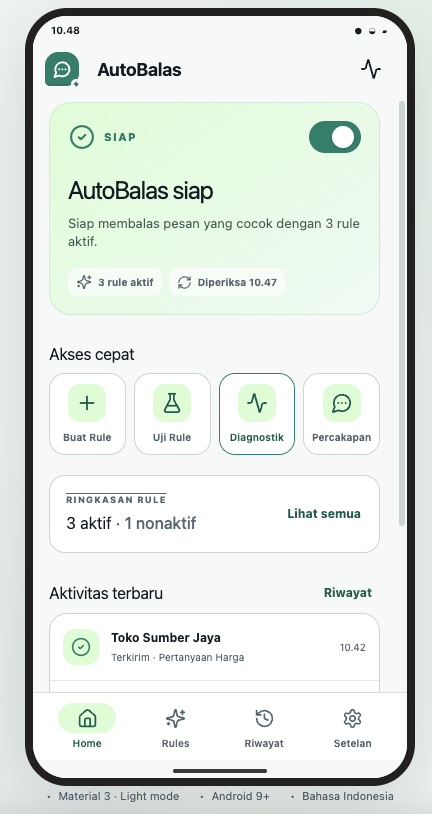
The first screen below uses your provided UI. The rest of the section continues the same visual direction for rules, testing, and history.
Users can immediately understand whether AutoReply is active, how many rules are running, and what happened recently.
Allow the app to read supported message notifications so it can identify whether a configured rule should run.
Choose the trigger keyword, target conversation, reply message, and schedule based on your needs.
Use history and diagnostics to see what was sent, what was skipped, and where you may need to adjust a rule.

AutoReply is positioned as a privacy-first tool. It is built around a straightforward, local-first user experience without forcing people into a cloud-based workflow.
Users can start without signing up for a separate account.
Rules, configuration, and activity are designed around local device usage.
AutoReply is presented as a minimal, privacy-focused product experience.
Set up privacy-first automatic replies, manage your rules, and keep your workflow simple on Android.